Granulator II
The second iteration of the Granulator instrument [2013]

Granulator II is a Max4Live synthesizer based on the principle of quasi-synchronous granular synthesis. It creates a constant stream of short crossfading sections of the source sample, and the pitch, position and volume of each grain can be modulated in many ways to create a great variety of interesting sounds. Granulator II also offers two multimode filters in series to further shape the resulting timbre. Granulator II is the second incarnation of a series of granular based synthesizers I wrote for my own usage since the addition of real time audio processing to Max in 1997. The latest and most advanced version is Granulator III.
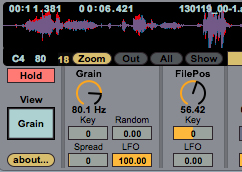
The display of Granulator II is divided in two parts that can be switched with the Grain/Filter switch on the left side.
Samples can be dragged from the finder, Live's browser or from Session/Arrangement into Granulator's waveform display. Mono samples are shown in dark violet, stereo samples are color-coded blue/red for the left/right channel.
Grain Position
Grain position can be changed by clicking in the waveform. It is possible to zoom in / out / show all / by using the zoom buttons. It is also possible to zoom in vertically dragging the little number box left of the 'zoom in' button. Granulator displays the total length of a sample in the upper left corner, followed by its current (static) position. While notes are playing, the actual position of each voice is displayed as vertical line(s). The display also shows if hold pedal is active (MIDI CC # 64), the last incoming MIDI note number, and on the right lower corner, the number of currently active voices.
Grain Size
The higher the frequency of the Grain parameter, the more grains per second are created and the shorter they become. Grain size can be modulated as a function of incoming note key, they can have a random fluctuation and via the LFO. It is also possible to have slightly different grain sizes for the left and right audio channel. This is essential for rich stereophonic modulations.
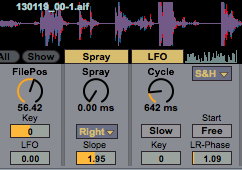
Unlike in a sampler, by default the grain position is not moving but instead is playing back the same single position within a soundfile. Things start getting interesting, as soon as there is some random variation of this position for each grain ('Spray'), or if the position is modulated via an LFO. The LFO can also modulate the Grain Size parameter. It features several waveforms and can operate with very long cycles up to several minutes for slowly evolving textures.
Sound examples
Changing Spray, Grain, and Position while chord is playing.
Applying LFO to grain position and playing with LFO parameters.
Grain Scanning
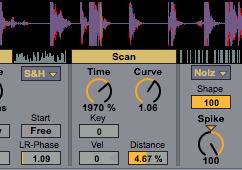
It is possible to scan through the file while it is playing. This can be used to create rough time-stretching and compression effects, vocoder-like sound or complex movements in combination with additional position modulation via LFO and Spray. Scan speed can be a function of velocity.The curve parameter modifies the scanning speed as a function of time.
Window Shape
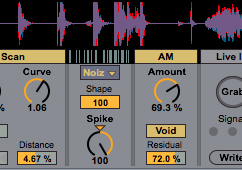
The shape of the window or envelope around each individual grain has an important influence on the overall sound. Typically one wants to have an equal power crossfade for smoothest granulation. However, sometimes other window shapes can be of interest. Granulator offers four shapes including a 'broken' shape that consists of a noise waveform and creates - noisy results. Shapes can be modified with the Shape and Spike parameters.
Sound example: Changing window shape: smooth, fall, rise, noise with longer grains
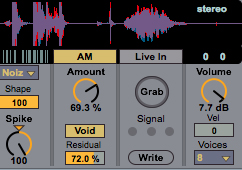
Amplitude Modulation
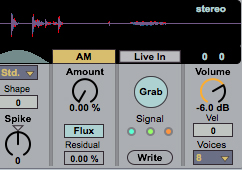
It is possible to modulate the volume of each grain with a random signal. For arbitrary reasons, I called this 'Fluxus'. Two kinds of modulation are possible: random muting of grains and random level change. The random muting of grains can be moderated with the Residual parameter.
Sound examples: applying Fluxus with shorter grains Excessive noise with FM, Spray, LFO driven position modulation and Noiz window shape.
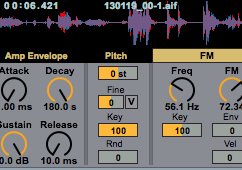
Envelopes and Pitch
Granulator offers a classic ADSR volume envelope with very long maximum times suitable for evolving textures. The Pitch section allows to detune a sample, modify the key scaling behaviour, allows to add a random pitch fluctuation per grain. There is also a quite experimental feature: The 'V' toggle allows to detune notes using velocity. A velocity of 70 implies no detuning, a velocity of 120 results in plus 50 cent, and 20 equals minus 50 cent.
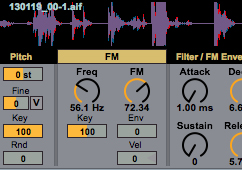
FM Modulation
It is possible to apply frequency modulation to grains. With low values for the modulation frequency this creates vibrato like effects, with very high frequencies it is possible to create a lot of digital dirt. In between the world is yours. The intensity of the modulation can be controlled via velocity and via the FM/Filter envelope.

Filters
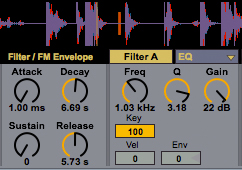
Granulator provides two filters in series, both filters are able to perform several filter modes. Most uncommon and very useful is the EQ mode, with Frequency, Gain and Q control, where the frequency can follow MIDI note pitch. A dedicated ADSR envelope allows to control filter frequency.
Envelopes and Pitch
Granulator offers a classic ADSR volume envelope with very long maximum times suitable for evolving textures. The Pitch section allows to detune a sample, modify the key scaling behaviour, allows to add a random pitch fluctuation per grain. There is also a quite experimental feature: The 'V' toggle allows to detune notes using velocity. A velocity of 70 implies no detuning, a velocity of 120 results in plus 50 cent, and 20 equals minus 50 cent.
Grab
When the additional GranulatorInput device is present in an audio track, one can capture audio from that track as a source for Granulator. A maximum chunk of 16 seconds can constantly be recorded and assigned to Granulator after hitting the Grab button. The audio is only stored in RAM. To save it with a live set, it needs to be written to HD using the Write button. The length of the recording buffer is defined in the GranulatorInput device. It can be 2,4,8, or 16 seconds. Sound example: Capturing mic input and using it immediately.
I consider Granulator III in many ways superior to this version from 2013. However, some details of it might make it still interesting today: Since the engine is much simpler with less modulation sources and no MPE support, it takes less CPU and allows to use up to 32 voices. It is also a true 'Max Patch' which means its internal structure is completely open and can be explored. And there are a few minor differences in parameters and sound. Granulator II is not supported anymore officially via Ableton or myself, but here is a download link: M4LGranulatorII_r57382_v1.3.alp.zip